0%
java生成文档(docx)模板,设置各种属性。
引入依赖
保持jar版本一致
1
2
3
4
5
6
7
8
9
10
| <dependency>
<groupId>org.apache.poi</groupId>
<artifactId>poi</artifactId>
<version>5.0.0</version>
</dependency>
<dependency>
<groupId>org.apache.poi</groupId>
<artifactId>poi-ooxml</artifactId>
<version>5.0.0</version>
</dependency>
|
poi中各个jar包的作用
| Maven artifactId |
Prerequisites |
JAR |
| poi |
commons-logging, commons-codec, log4j |
poi-version-yyyymmdd.jar |
| poi-scratchpad |
poi |
poi-scratchpad-version-yyyymmdd.jar |
| poi-ooxml |
poi, poi-ooxml-schemas |
poi-ooxml-version-yyyymmdd.jar |
| poi-ooxml-schemas |
xmlbeans |
poi-ooxml-schemas-version-yyyymmdd.jar |
| poi-examples |
poi, poi-scratchpad, poi-ooxml |
poi-examples-version-yyyymmdd.jar |
| ooxml-schemas |
xmlbeans |
ooxml-schemas-1.1.jar |
实际应用
| Component |
Application type |
Maven artifactId |
| POIFS |
OLE2 Filesystem |
poi |
| HPSF |
OLE2 Property Sets |
poi |
| HSSF |
Excel XLS |
poi |
| HSLF |
PowerPoint PPT |
poi-scratchpad |
| HWPF |
Word DOC |
poi-scratchpad |
| HDGF |
Visio VSD |
poi-scratchpad |
| HPBF |
Publisher PUB |
poi-scratchpad |
| HSMF |
Outlook MSG |
poi-scratchpad |
| OpenXML4J |
OOXML |
poi-ooxml plus one of poi-ooxml-schemas, ooxml-schemas |
| XSSF |
Excel XLSX |
poi-ooxml |
| XSLF |
PowerPoint PPTX |
poi-ooxml |
| XWPF |
Word DOCX |
poi-ooxml |
| Common SS |
Excel XLS and XLSX |
poi-ooxml |
示例代码
1
2
3
4
5
6
|
XWPFDocument xwpfd = new XWPFDocument();
XWPFParagraph xwpfP = xwpfd.createParagraph();
XWPFRun xwpfRun = xwpfP.createRun();
|
文本属性
1
2
3
4
5
6
7
8
9
10
11
12
13
14
15
16
17
18
19
|
xwpfRun.setText("舜发于畎亩之中, 傅说举于版筑之间, 胶鬲举于鱼盐之中, 管夷吾举于士...");
xwpfRun.setBold(false);
xwpfRun.setColor("BED4F1");
xwpfRun.setDoubleStrikethrough(false);
xwpfRun.setEmbossed(false);
xwpfRun.setFontFamily("宋体");
xwpfRun.setFontFamily("华文新魏", FontCharRange.cs);
xwpfRun.setFontSize(14);
xwpfRun.setImprinted(false);
xwpfRun.setItalic(false);
xwpfRun.setStrikeThrough(false);
xwpfRun.setSubscript(VerticalAlign.SUBSCRIPT);
xwpfRun.setTextPosition(20);
xwpfRun.setUnderline(UnderlinePatterns.DASH_LONG);
xwpfRun.addBreak();
xwpfRun.addTab();
xwpfRun.addCarriageReturn();
|
写入
1
2
3
4
5
6
7
8
9
10
11
12
13
14
15
16
17
18
| String path = "F:\\WordTest";
String fileName = "WordWrite.docx";
File file = new File(path);
OutputStream stream = null;
try {
stream = new FileOutputStream(new File(file, fileName));
xwpfd.write(stream);
} catch (IOException e) {
e.printStackTrace();
} finally {
try {
if (stream != null) {
stream.close();
}
} catch (IOException e) {
e.printStackTrace();
}
}
|
示例
1
2
3
4
5
6
7
8
9
10
11
12
13
14
15
16
17
18
19
20
21
22
23
24
25
26
27
28
29
30
31
32
33
34
35
36
37
38
39
40
41
42
43
44
45
46
47
48
49
50
51
52
53
54
55
56
57
58
59
60
61
62
63
64
65
66
67
68
69
70
71
72
73
74
75
76
77
78
79
80
| package com.kuang.common;
import com.alibaba.fastjson.JSONObject;
import org.apache.poi.xwpf.usermodel.*;
import java.io.*;
import java.util.Date;
public class WordTest {
public static void generateDoc(JSONObject jsonObject) {
XWPFDocument xwpfd = new XWPFDocument();
XWPFParagraph xwpfP = xwpfd.createParagraph();
xwpfP.setAlignment(ParagraphAlignment.CENTER);
XWPFRun xwpfRun = xwpfP.createRun();
xwpfRun.setText("古诗文默写");
xwpfRun.setFontSize(20);
xwpfRun.setFontFamily("宋体");
XWPFParagraph xwpfParagraph = xwpfd.createParagraph();
xwpfParagraph.setAlignment(ParagraphAlignment.LEFT);
XWPFRun xwpfRun1 = xwpfParagraph.createRun();
xwpfRun1.setFontFamily("宋体");
xwpfRun1.setFontSize(14);
xwpfRun1.setText("杨家有女初长成,");
XWPFRun xwpfRun2 = xwpfParagraph.insertNewRun(xwpfRun1.getTextPosition() + 2);
xwpfRun2.setFontFamily("宋体");
xwpfRun2.setFontSize(14);
xwpfRun2.setColor("FF0000");
xwpfRun2.setText(jsonObject.getString("yang"));
XWPFRun xwpfRun3 = xwpfParagraph.insertNewRun( xwpfRun2.getTextPosition() + 3);
xwpfRun3.setText("天生丽质难自弃,");
xwpfRun3.setFontFamily("宋体");
xwpfRun3.setFontSize(14);
XWPFRun xwpfRun4 = xwpfParagraph.insertNewRun( xwpfRun3.getTextPosition() + 4);
xwpfRun4.setText(jsonObject.getString("yi"));
xwpfRun4.setFontFamily("宋体");
xwpfRun4.setFontSize(14);
xwpfRun4.setColor("FF0000");
String path = "F:\\WordTest";
String fileName = "WordWrite" + new Date().getTime() + ".docx";
File file = new File(path);
OutputStream stream = null;
try {
stream = new FileOutputStream(new File(file, fileName));
xwpfd.write(stream);
} catch (IOException e) {
e.printStackTrace();
} finally {
try {
if (stream != null) {
stream.close();
}
} catch (IOException e) {
e.printStackTrace();
}
}
}
public static void main(String[] args) {
JSONObject json = new JSONObject();
json.put("yang", "养在深闺人未识。");
json.put("yi", "一朝选在君王侧。");
json.put("liu", "六宫粉黛无颜色。");
generateDoc(json);
}
}
|
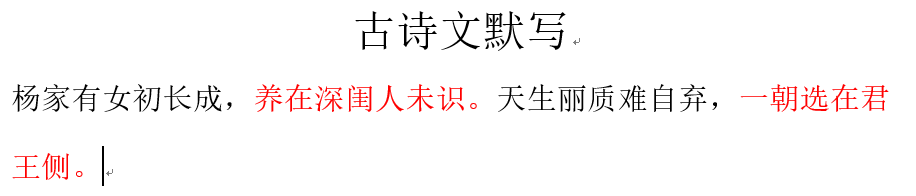
结果